
Where it started#
ToolTab began as an always-on-top Windows clipboard workspace, written in C# on .NET 10 with WPF. Its first job was simple: capture every piece of text you copy, keep a persistent local history, and let you edit the active entry and have the change flow straight back to the Windows clipboard. A second editor beside it turned a comma-separated clipboard entry into a one-item-per-line list, a small thing that turned out to be useful every day.
Then it grew the way personal tools do: whenever the owner wanted a small utility, it went into a new tab. The result was a tabbed suite whose left-side navigation held several unrelated tools in one window, each with its own character. That habit of building what you need, when you need it, is the same instinct that produced Nodal, only on a bigger scale and with agents doing the typing.
What was in it#
CopySquared#
The clipboard workspace. Automatic text capture through the Windows clipboard listener, pinning, protected deletion, a copy button with sensible selection rules and a File Explorer shortcut that copies selected names without their paths.
HiberSleep#
Compact power controls: monitors off, lock and monitors off, sleep and hibernate, each behind a two-click arm-and-confirm so you cannot trigger one by accident.
SpaceWatcher#
A storage monitor that showed live free, used and total capacity for internal, USB and removable drives, with per-drive warning thresholds. It is now the first plugin in Nodal’s plugin lab.
iWantMyNotes and ProjectHero#
A notes tab and a scheduled folder-backup tool with named entries, per-entry schedules from minutes to years, validation and a deliberate remove confirmation.
DaRealVinci#
A helper for a video editor: it captured timecodes from the clipboard in stages and reported progress, a seed for later automation ideas around editing software.
Themes#
A header selector that switched the whole palette between Green, Light, Purple, Gold, Blue, Dark, Red and Black and red.
The two parts that mattered most#
The Beeper#
The Beeper was a notification center. Feature code published notifications through stable interfaces instead of touching windows, and a separate borderless window displayed them: a small square in the theme color, expanding on a delayed hover into a panel of recent notifications with persistent history, unread state, dismissal, snoozing and scheduling. The rules were refined by use: a notification that reports something flashes twice and removes itself, while one that asks something stays and pulses until the session stops asking. It survived the main window being minimized, with a tray menu to open, lock or exit.
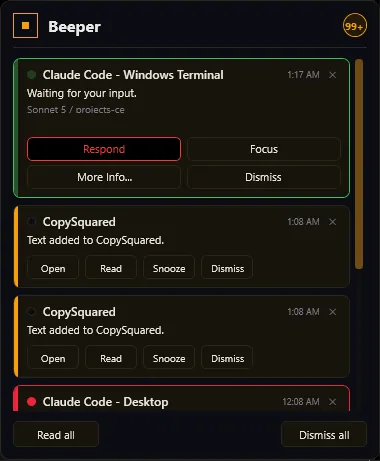
That layout is where the notification center in Nodal comes from. Nodal’s own planning notes say it takes its layout and information from the v1 Beeper and its visual language from a newer design. See the notification center page.
CodexBot, the activity monitor#
CodexBot, also called AI Activity, detected Codex and Claude Code sessions running across Warp, Windows Terminal, VS Code, Cursor, the packaged desktop apps and even conversations hosted inside Claude Desktop. It showed account-level quota separately from session-level data, combined running and ended sessions into one list with pinning, hiding and export, and offered focus and More Info actions. Because it watched from outside, it could only do what the evidence allowed: it would never guess. Where it could not read exact options from a permission prompt, it offered no buttons rather than wrong ones. It could write a prompt straight into a session’s console without focusing any window, with the identity of the target rechecked before every send.
How it was built#
The architecture was a conventional, careful WPF app: MVVM, platform services behind core interfaces, local JSON storage beside the binaries, WebView2 for an in-tab browser and a stack of Windows integration for the clipboard listener, a conditional keyboard hook, tray lifecycle, DPI-aware window placement and power operations. Four production projects and a test project made up the solution, and the suite passed more than 500 tests in its later state. Testing deliberately avoided real power operations: no automated test sleeps, hibernates or locks the machine.
The project’s documentation was unusually frank. The changelog records bugs such as a hook helper process that never exited because it waited for the end of its standard input, which kept it alive for twenty-one hours and blocked a clean rebuild. The first version of the fix looked right and changed nothing, because the console reader’s asynchronous method blocks the caller anyway. It was only caught because the test was written to reproduce the hang rather than to confirm the fix. That sort of lesson is exactly what later became the evidence habits described on the how it’s built page.
Why it needed a version 2#
v1 hit three walls.
- Watching is not owning. From outside, status is a guess assembled from process names and window titles. Reliable control needs the app to start the session itself. Hence Agent Mode and Tab Mode, which launch and own what they show.
- A tab suite is not a plugin system. Every new tool required changing the app. The ambition grew to letting anyone add tools without that, which is NodalForge.
- Windows only, and tied to one UI technology. A WPF app cannot move to Linux or macOS and cannot host the same web-style UI that plugins want. The research compared WPF, WinUI, Avalonia, Tauri and Electron and chose Electron. See architecture.
What survived the move#
| In v1 | In Nodal |
|---|---|
| Beeper notification window | NodalBeeper, with a new real event pipeline |
| CodexBot session detection and usage bars | First-class sessions, with a usage meter fed by the provider’s own numbers |
| Theme library | The accent palette, plus custom accents, fonts and layout |
| SpaceWatcher | The first example plugin in the plugin lab |
| HiberSleep, ProjectHero, iWantMyNotes | Candidates to return as plugins |
| Background prompt delivery into a console | Replaced by hosted sessions and a guarded voice route |
| Dictation prototype | The separate NodalVoice app |
The old app is still reference material. Its screenshots shaped the Beeper, and the project keeps a naming table so that nobody confuses the old WPF application with the new one: ToolTabv1 means the old app, ToolTabv2 and Nodal are the same product.
A note on the name#
The name changed more than once. In the early records the two apps were called ToolTab and ToolTabv2; the source was renamed Nodal on 23 August 2026 and the records were deliberately left alone. That is why you will still see ToolTab v2 in places. For the full chronology, see the history page.