
What Nodal is#
Nodal is an agentic development environment: a desktop application, written with Electron, React and TypeScript, where AI coding agents are the main characters instead of a side panel. It is also known as ToolTab v2, because it grew out of an earlier personal tool called ToolTab (the ToolTab v1 page tells that story). The owner describes it plainly: it is basically a Codex clone, but with features the owner actually wanted, and the freedom to keep adding more.
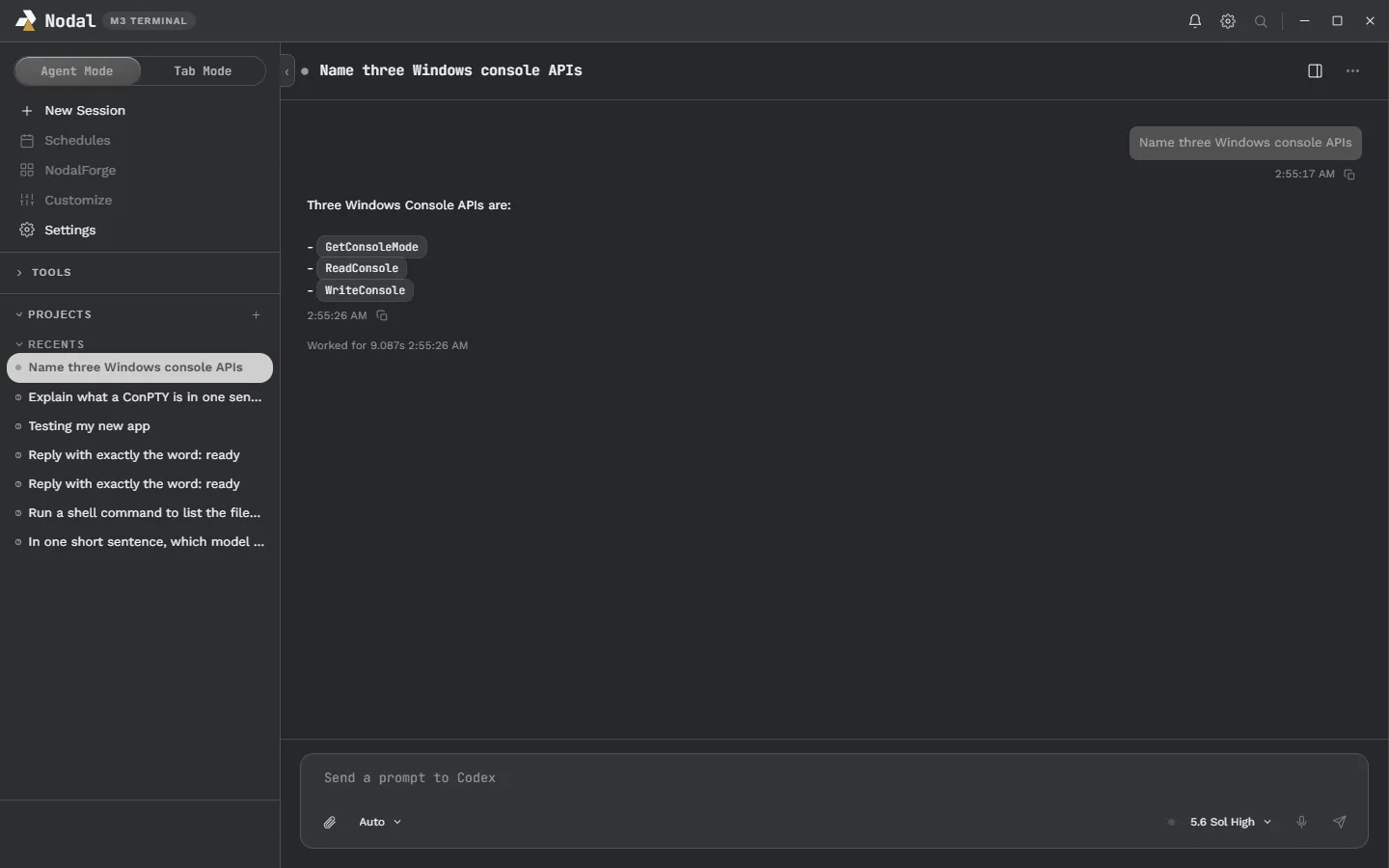
Two ideas hold it together. First, agents run in two shapes, and Nodal supports both with one switch. Agent Mode is a conversation-first workspace in the style of the Codex desktop app, with projects and sessions on the left, a streaming conversation in the middle and a tabbed sidebar on the right. Tab Mode is a grid of real terminals in the spirit of Warp, where you run Codex CLI, Claude Code or any other command-line agent in windows you arrange yourself.
Second, you should not have to hunt for the agent that needs you. The notification center (called NodalBeeper) pops up when an agent finishes or asks a question, lets you answer in place, and can take dictated or typed prompts for any agent you have running.
The philosophy: your workspace, your rules#
Nodal’s manifesto is seven lines long and every product decision is checked against it. The user owns the workspace. The user owns their data. The user chooses their AI providers. Everything should be customizable, everything should be modular, vendor lock-in is to be avoided, and simplicity beats unnecessary complexity.
That is why the app has a theme system with seven accent colors plus a custom one, separate title and body fonts, drag-to-arrange windows and a plugin system called NodalForge. It is why Nodal never stores your Codex, Claude or OpenAI credentials, and why a model from a local Ollama install sits in the same picker as a ChatGPT model. The short version of the philosophy is the headline above: use the app exactly how you want to use it. Read more on the theming page, the plugins page and the providers page.
What you can do with it today#
Talk to several agents#
Start sessions with ChatGPT/Codex, Claude Code or a local Ollama model, watch answers stream, approve or deny actions inline, and steer or queue prompts while a turn runs.
Keep real terminals nearby#
Tab Mode hosts genuine PowerShell, Command Prompt and WSL shells with xterm.js and ConPTY, arranged in pages of draggable, resizable windows.
Review what changed#
A changed-files card appears under each turn and opens a read-only Review tab with line diffs, so you can check an agent’s work before trusting it.
Browse and read files in place#
The right sidebar has Terminal, Web Browser, File Explorer and Review tabs. The browser is sandboxed and loads web pages only.
Answer from anywhere#
The notification center shows what each agent is doing and lets you respond, focus its window, read more or dismiss it without finding the right window first.
Make it look and act like yours#
Pick colors, fonts and layout today. Plugins, built on a sandboxed utility-process model, are being readied for before version 1.
Agents with faces: AgentBoard and avatars#
Nodal is built by AI agents that coordinate through a small shared message board, and that idea has become part of the product’s identity. The AgentBoard page explains how agents read and write plain, separate files so they never trample each other, and how the app’s next step is to give every agent a small, unique avatar with eyes that blink, follow your pointer and emote by state: scanning while it works, wide-eyed and bouncing when it needs you, closed-eye smiles when it is done. The bots in the animation at the top of this page are a preview of that direction; the page explains exactly what is built today and what is still a plan.
An honest angle: ideas are cheap now#
OpenAI, Anthropic, DeepSeek and xAI have all shipped features that resemble pieces of Nodal: multi-session sidebars, built-in terminals and browsers, notifications, plugin hooks. With AI coding tools, a good idea can be turned into a working prototype in an afternoon, so an idea alone is worth very little. The owner says as much, and that is the reason Nodal is built in public. The value is in the taste, the persistence and the specific choices that make the tool fit one person’s way of working, and in letting other people watch, copy, challenge and help.
The build happens on The Late Build livestream. You can watch on Twitch and YouTube, follow along on X, and chat with the owner and other testers on Discord. The creator hub has the stream-side view of the same story: the livestream page, the socials page, and the games Nodal Play and Nodal Strike. For the development process itself, read how it’s built and the development history.
How it was planned#
Nodal did not start as code. It started as a written plan: Markdown files organized into about five “pages”, each with five to eight AI agents and a task list, slowly turning a loose idea into product requirements, an architecture, a prototype scope and finally a build. The planning pages used ChatGPT, Claude and Codex in different roles, each reviewing the others, with a human product owner approving every gate. Only after that did implementation begin. More than 140 numbered decisions are recorded in a single ledger, and every delivered package comes with dated test evidence. The history page walks through the timeline and how it’s built explains the roles.
Themes and layout#
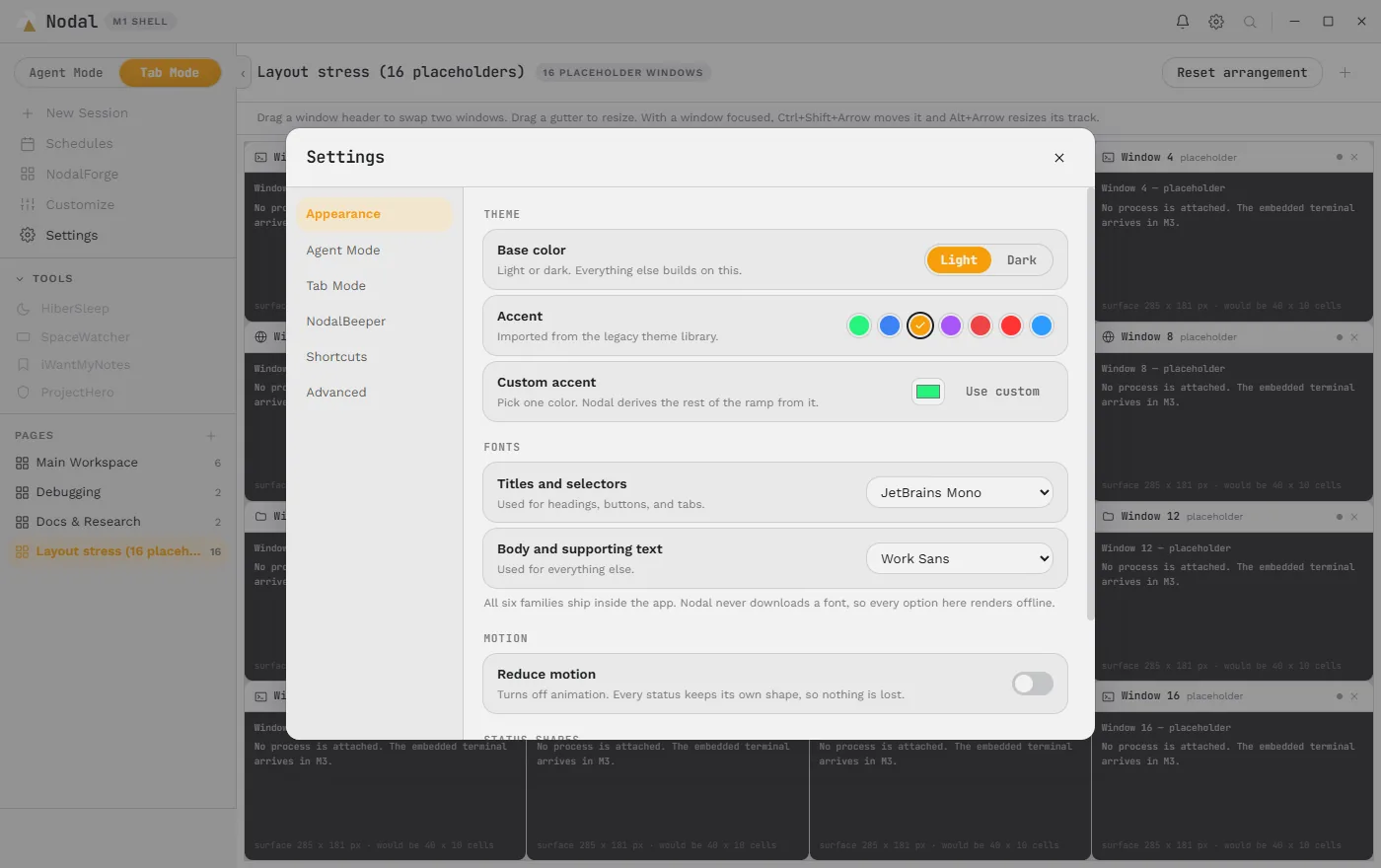
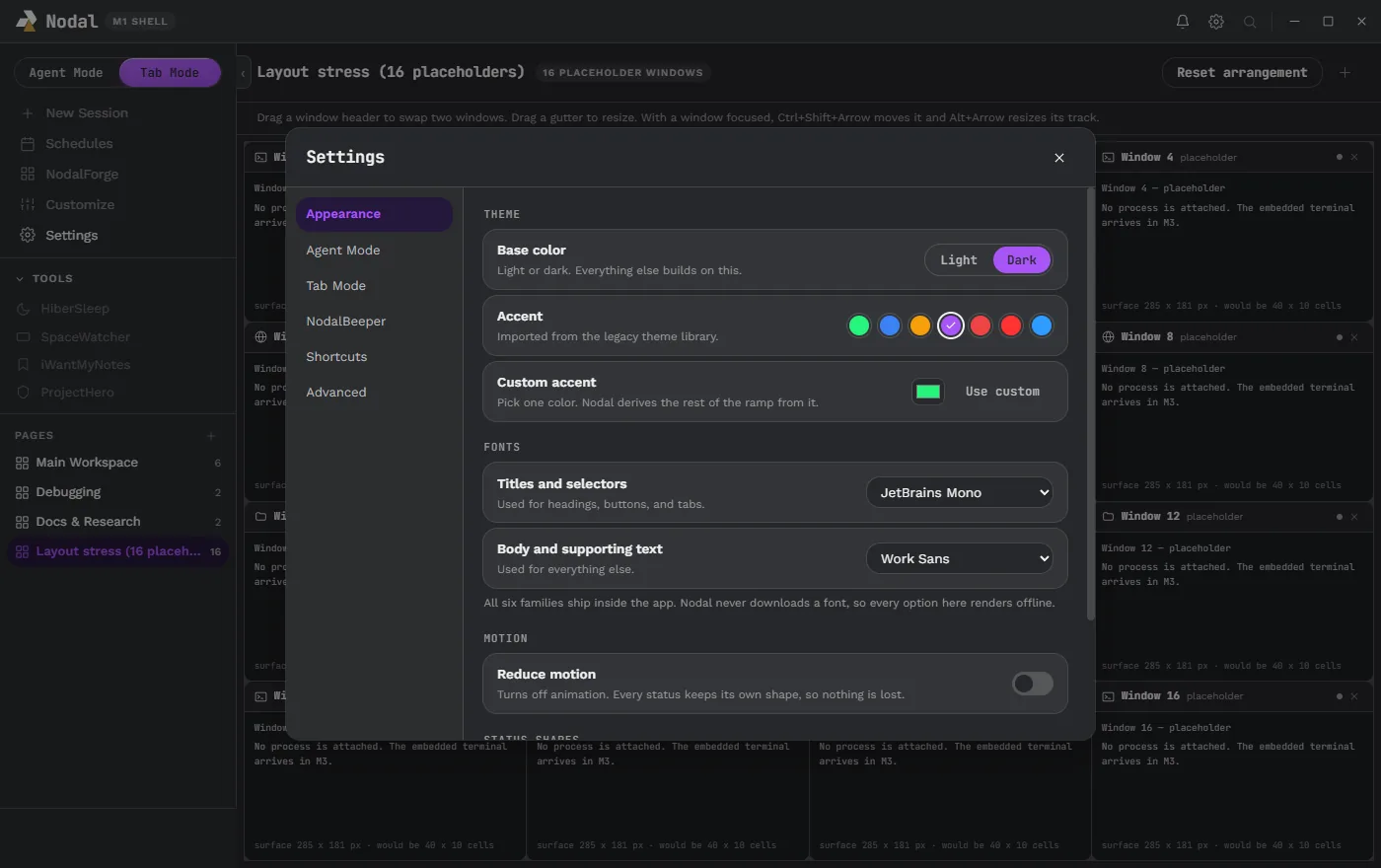
Two captures from the early shell show the theming idea: the same Settings page in a light base with a gold accent, and in a dark base with a purple accent. Layout is just as flexible. Windows can be dragged to rearrange and gutters dragged to resize, with a reset when you want the defaults back.
Platforms and status#
Nodal is in beta testing. Beta 0.2.0 targets Windows 10 and 11 (64-bit). Linux runs from the same codebase and has been built and measured on Pop!_OS, with feature releases landing there a little after Windows. macOS is planned but not started. There is no public download from this site; the beta page explains who is testing, what the beta contains and how to get involved. The roadmap lists what is next, including side chat, signed installers and the plugin work that must be finished before version 1.
Who Nodal is for#
Nodal is for people who already use AI coding agents every day and have started to feel the friction. You might run Codex in one window, Claude Code in a terminal and a local model in a third, and spend more time finding the right window than reading the answer. You might like the Codex desktop app but wish it showed your own colors, or like Warp but also want a conversation view. You might want to know, without watching, when a long task is finished, and to reply from wherever you are. If any of that sounds familiar, Nodal is trying to be the single place where those things live together.
It is not trying to replace your editor. There is a file explorer with editable text tabs and a read-only review of changes, but the heavy editing is still something your agents and your usual tools do. It is also not trying to be a cloud service: the app runs on your computer, talks to the providers you choose and keeps its own records in local files.
A day with Nodal#
Picture a typical session. You open a project and start an Agent Mode session on a Codex model with a plan-only permission mode, ask it to outline a change, then switch it to Manual and let it work. While it runs, you flip to Tab Mode, where Claude Code is refactoring a different folder in one terminal and a build is running in another. The notification center collapses to its small mark in the corner. Twenty minutes later it pops up: the Claude Code session needs approval to run a command. You read the command in the card, answer from there and carry on. When the Codex turn finishes, its card appears too, and the conversation folds into a single Worked for line. You open the Review tab, read the diff and decide what to keep. None of that required hunting through windows, and every step is an ordinary feature described on the pages linked above.
Where to go next#
- New here? Start with the features overview, then Agent Mode and Tab Mode.
- Curious about the engineering? Read the architecture and security pages.
- Interested in the AI side? See providers, the benchmarks and IdeaBoard.
- Questions? The FAQ covers downloads, pricing questions, privacy and platform support, and the about page lists the places to find the creator.