
What Agent Mode is#
Agent Mode is where Nodal most resembles the Codex desktop app, and that is on purpose. The owner calls Nodal “basically a Codex clone, but with cool features”, and Agent Mode is the part that earns the first half of that description. You pick a project folder, start a session, send a prompt and watch a real agent turn stream into the conversation. What makes it Nodal rather than a copy is what surrounds that conversation: three providers instead of one, a notification center that works even when the window is closed, themes you can fully change, and an engineering record that says exactly which behaviors were verified against a live provider.
One rule shapes the whole surface: nothing is simulated in a real session. When there is no conversation yet, Agent Mode says so, and the message reads that everything shown comes from a real turn, so the screen stays empty rather than showing an invented transcript. The same discipline runs through the recorded engineering evidence, where fake providers are used only for failure cases and are never allowed to upgrade a claim to “verified live”.
I will read the settings component first, then add a toggle that stores the choice and applies it on load. I changed two files and ran the tests; they pass.
Anatomy of the window#
The sidebar#
The top of the sidebar holds the Agent Mode and Tab Mode switch, then New Session, Schedules, NodalForge, Customize and Settings. Below that are Projects, each holding its sessions, and Recents for sessions with no project. A project is a name for a folder Nodal may read and edit, together with its sessions. Sessions show a status dot and a small provider badge (Cx for Codex, Cl for Claude, Ol for Ollama). A session can be renamed, pinned, copied into a new session that continues the history, or archived. Archiving is local to Nodal: the session leaves Projects and Recents, appears under Archived and can be restored, and Nodal does not call the provider’s own archive method, so your provider-side history stays intact.
The conversation#
Prompts and answers appear with the time they were sent. While the agent works, a Writing indicator can be expanded to show the live assistant output, after which the finished block is revealed once. When a turn completes, its internal work (reasoning notes, tool rows, file changes) folds into a single line such as “Worked for 42s · 13 session tokens” with the final answer visible beneath it. Failed turns, running turns and anything that needs you are never collapsed. Long conversations keep your reading position while new text arrives, and the view follows smoothly only if you were already at the bottom.
The composer#
The prompt box accepts text and images, shows attached files, and supports $ and / menus for skills and commands and @ for file mentions. Drafts are kept per session. The row beneath holds the attachment button, the permission mode, a context ring and usage meter, the model and effort picker and a microphone. Enter makes a new line and Ctrl+Enter sends, a choice made because multi-line prompts are the norm when briefing an agent.
Models, effort and permission modes#
The model picker is live before a session exists, and the choice travels into the first request, so the very first turn runs on the model you chose. The catalogue comes from the provider’s own list, never from a baked-in table, because an account’s catalogue changes without warning. Each model lists the abilities that matter (Tools, Images, Reasoning effort) and, when it has them, its own reasoning-effort levels. A default you set is remembered; if nothing has been chosen, Nodal sends no model and shows the account’s own default rather than asserting one.
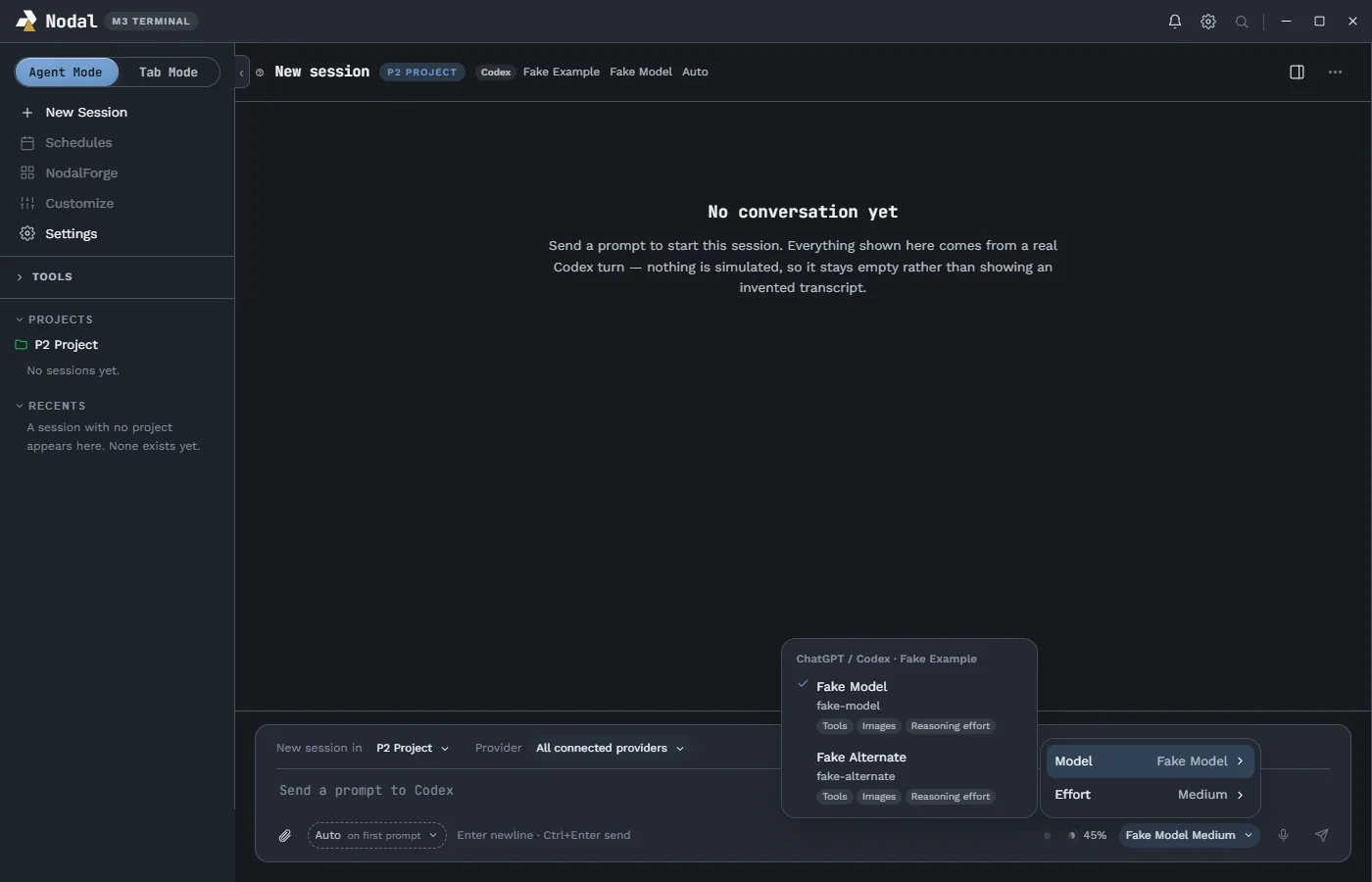
Permission modes are named pairs of a real sandbox and approval policy rather than loose toggles:
- Plan reads and proposes without changing anything.
- Manual asks before edits and commands.
- Auto lets edits run and asks for commands.
- Accept edits accepts file edits and asks for commands.
- Bypass permissions answers approvals automatically, is never a default, and still shows questions to the user.
The behavior of each mode differs a little by provider; the providers page has the comparison table.
Steer, queue and approvals#
While a turn is running you can still type. Steer adds text or images to the current turn so the agent sees your correction immediately. Queue for later sends prompts in order when the turn ends; the queue lives in memory for the current run, and a stopped or failed turn leaves queued prompts for an explicit retry. Steer is offered where the provider supports it (Codex does); for Claude, which finishes its current turn first, Nodal queues instead and says so.
When an agent wants to do something that needs a decision, the approval appears inside the conversation: a command with its working directory and reason, a file change, a permission request or a structured question with options and a free-text fallback. Questions marked secret are masked. The same question appears identically in the notification center, so you can answer from whichever place is closer.
Usage, context and the status line#
A small meter beside the composer shows how much of your plan is left. It reports the window that is furthest along rather than the shorter one, because being at 90 percent of a weekly limit is the real constraint even when the five-hour window sits at 10 percent. Clicking it opens a usage view with reset times, available one-off resets and daily history for Codex. Nodal computes nothing here: the percentage is the provider’s own, and there is no “about N turns left” projection, because an estimate is wrong exactly when someone checks it before a long run. The context ring shows the last request’s tokens against the model’s window. For Claude it shows the five-hour and seven-day windows and Claude Code’s own cost estimate.
Importing and resuming sessions#
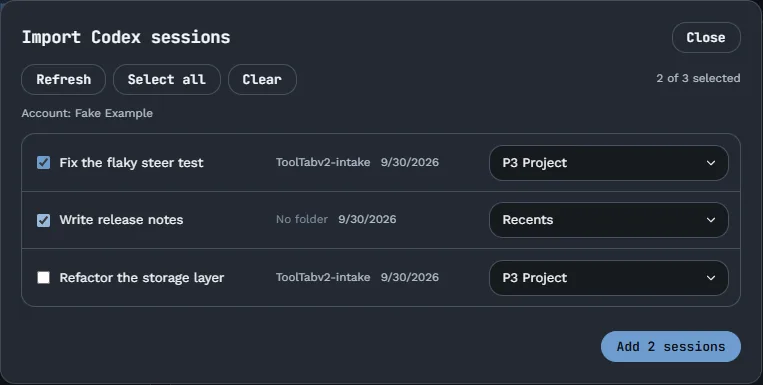
Nothing comes into Nodal by itself. On first start, you choose which providers to set up. An opt-in import lists the sessions already on your computer (Codex threads and Claude Code session files), lets you choose which to add and under which project, and can be turned into an automatic switch that adds new sessions as they appear after asking how many existing ones to include. The import never changes the originals: Claude Code files are read, not written. Sessions from a previous run can be prompted again because a record outlives any one provider thread.
Review, files and the side panel#
The panel at the right of a conversation hosts Terminal, Web Browser, File Explorer and Review tabs. A changed-files card in the conversation opens the Review tab, which shows the last turn or the working tree with read-only diffs. The File Explorer previews text, images, HTML and PDF, and text files can be edited and saved in separate tabs with conflict detection. The panel belongs to the session: it can be resized, expanded to Full View and reopened any time from the header. The features overview covers these tabs, and Tab Mode shows the same tools as free-floating windows.
Behind the scenes#
For Codex, Nodal speaks the Codex app-server protocol over standard input and output. Its adapter reads a version signal from the handshake, treats every response as untrusted input, and fails only the call that needs a missing method, so a newer Codex CLI keeps Agent Mode available and merely flags itself as untested. A credential-bearing field in the protocol is discarded before any other code sees it; the security page explains how that boundary was measured. States map onto a small canonical vocabulary (Idle, Working, Waiting for user, Waiting for approval, Error, Exited and Unknown) that the notification center also uses. The architecture page has the full picture.
Reliability, found by running it#
Several of Agent Mode’s defects were found not by tests but by running the packaged app. A launch override that started a second copy of the application made every request time out into a plausible, wrong answer. A session list drew 210 terminal windows as conversations until a migration, which deleted nothing, separated them. Closing or dragging one Tab Mode window once killed other windows’ terminals, because a window was identified by its position in the layout, until windows became a flat list keyed by identity. Each of these is recorded with its fix, and a whole defect class is now unreachable because a supported control with no handler refuses to render at all. The point of telling you is that the project’s habit is to say what broke.
Try it#
Agent Mode is part of the beta; see the beta page for how testing works and the FAQ for common questions. If you would like to see it in motion, the owner builds it live; the stream page on the creator hub lists when.