
How to read this page#
Nodal is under active development and its records are unusually strict about what is real. Throughout the documentation, claims are graded: real (observed against a live provider), simulated (observed against a purpose-built test double) and planned (designed, not built). This page follows the same habit. Every feature below carries a status of In beta, Partly built or Planned, so you can tell a shipped capability from an intention.
| Feature | Status | Where to read more |
|---|---|---|
| Agent Mode with Codex (ChatGPT sign-in) | In beta | Agent Mode |
| Claude Code sessions (sign-in and API-key cards) | In beta | Providers |
| Ollama local models with tool use | In beta | Providers |
| Tab Mode with real terminals | In beta | Tab Mode |
| Right sidebar: Terminal, Web Browser, File Explorer, Review | In beta | Below |
| Notification center (NodalBeeper) | In beta, still being refined | Notification Center |
| Voice dictation to agents (NodalVoice) | Separate app, integration in progress | NodalVoice |
| Theme system: colors, fonts, layout | In beta | Theming |
| Plugins (NodalForge) | Test build only; ready before version 1 | Plugins |
| Agent avatars with emotes | Planned (status dots today) | AgentBoard |
| Side chat | Planned, after the beta | Roadmap |
The two modes and one switch#
A rectangular switch at the top of the sidebar flips between Agent Mode and Tab Mode. Switching does not close what you were doing: terminals in Tab Mode keep running with the same process IDs when you look at Agent Mode and come back, because Nodal learned early that killing every shell on a mode change was a bad idea. The two modes share projects, the notification center, the theme and the same right-sidebar tools.
Agent Mode#
Streaming conversations, approvals, steer and queue, images, skills, file mentions, a model and effort picker, permission modes and a usage meter.
Tab Mode#
Pages of draggable, resizable windows. Each window is a real terminal, a browser or a file explorer.
The right sidebar: Terminal, Browser, Files and Review#
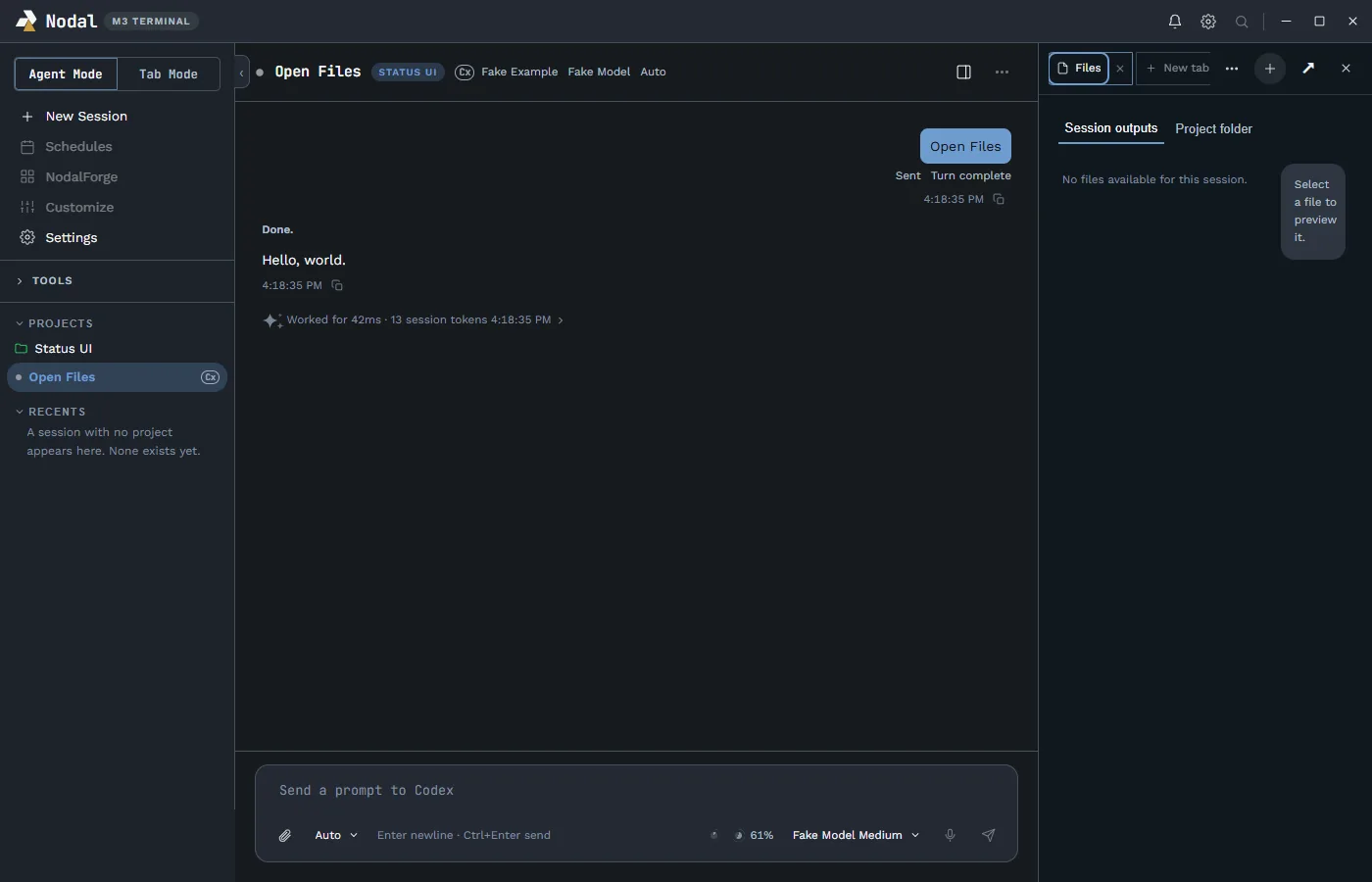
Beside every Agent Mode conversation is a tab strip, like the one in the ChatGPT and Claude desktop apps. You can open as many tabs as you like, each with its own terminal or browser, and keep the agent’s work in view while you check it. A Full View button gives one tab the whole window, and the width you drag the panel to is remembered.
- Terminal. A shell running in the project folder. Choose PowerShell 7, Windows PowerShell, Command Prompt, a WSL distribution or one of your own Windows Terminal profiles. It uses the same xterm.js and ConPTY stack as Tab Mode, so it behaves identically.
- Web Browser. Browse inside the window. It is sandboxed, loads web pages only and has an Open in browser button for when you want your real browser. Each browser tab has an ephemeral session of its own.
- File Explorer. The session’s outputs or the whole project folder, with previews for text, images, HTML and PDF. Text files open in editable tabs with Save, Save As, Undo, Redo and a conflict check.
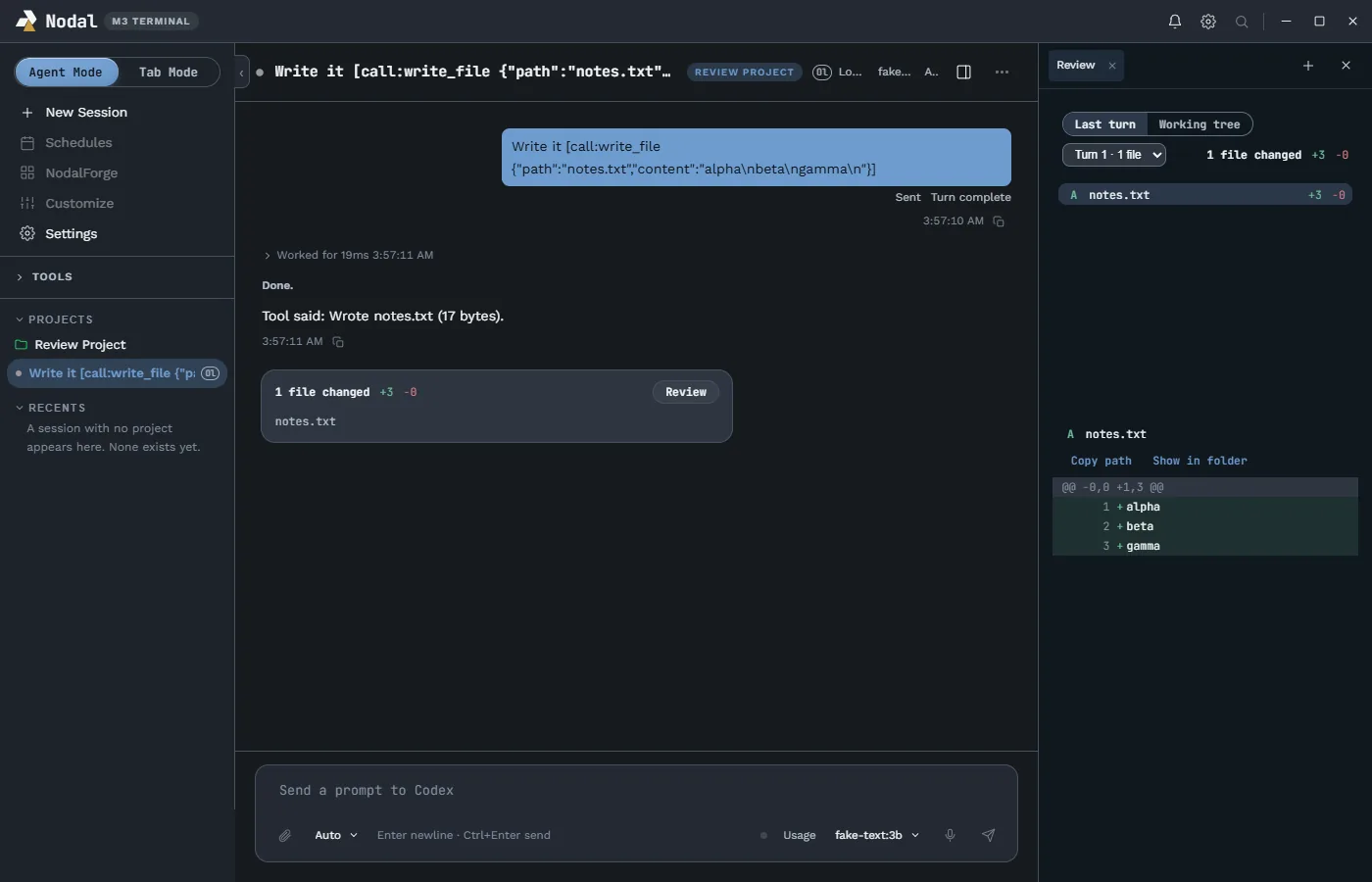
- Review. Read the files an agent changed and the line diffs, for the last turn or the working tree. It is read-only, and uses Git with fixed arguments so nothing is ever written.
Review and turn summaries#
Each completed turn can show a compact changed-files card with the number of files and the added and removed line counts, and a Review button that opens the diff. Completed turns also fold their internal work (reasoning notes, tool rows, file changes) into one “Worked for” line that expands on click, so the conversation stays readable while the final answer remains visible. A turn that failed, is still running or needs you never collapses. A bottom status line shows how long the active turn has been working and the session tokens the provider reported, nothing estimated.
Providers and accounts#
Nodal drives the agent tools you already use rather than reinventing them. Codex connects through its own app-server protocol, Claude through your installed Claude Code, and local models through Ollama’s daemon on your computer. Nodal creates no credential store of its own. Each provider card in Settings shows its connection state, version, capabilities and a Sign in, Sign out or Refresh button, and a control that cannot act is disabled with a reason shown. The providers page compares the three in detail.
Notification center and voice#
NodalBeeper is a separate, always-available window that lists every agent session by mode, shows the question an agent is waiting on and offers the right actions: Respond, Focus, More info and Dismiss for an agent that needs you; Open, Read, Snooze and Dismiss for a report. It collapses to a small mark, expands on hover, sits in the tray with an attention count and sends minimal, redacted desktop toasts. NodalVoice, the companion dictation app, is designed to deliver a dictated prompt to a chosen session after a preview and confirmation. See the notification center page and the NodalVoice page.
Customization#
The Appearance settings offer a light or dark base, seven accent colors and a custom accent (Nodal derives the rest of the ramp), separate fonts for titles and body text from six bundled families, a reduce-motion switch and status shapes so state never depends on color alone. You can transfer a whole custom theme between machines, drag windows into new arrangements and reset them. Plugins, through NodalForge, are intended to take over wherever settings stop. See the theming page.
Built for safety and measurement#
The renderer runs sandboxed with context isolation and no Node integration, talking to the main process only through a narrow, named preload bridge. Storage is atomic local JSON with one writer queue, schema versions and quarantine for corrupt files. Terminals are owned by identity (process ID plus start time) and are never force-killed unless that identity checks out. The local gate for the beta line ran more than 1,600 unit tests, and more than 150 Electron end-to-end cases passed across the suite. The architecture and security pages explain these in detail.
Projects, sessions and the sidebar#
Everything in Nodal hangs off projects. A project is a name for a folder that Nodal may read and edit, together with the sessions that belong to it. Sessions with no project live under Recents. In Agent Mode, the sidebar lists projects and their sessions with a status dot and a small provider badge, so a Codex session, a Claude session and an Ollama session are easy to tell apart at a glance. In Tab Mode, the same sidebar lists pages instead, each with a count of the windows it holds. A session can be renamed, pinned, copied into a new session that continues the history or archived and later restored. Nothing is deleted behind your back: archiving is local to Nodal and leaves the provider’s own history alone.
The sidebar also carries New Session, Schedules, NodalForge and Customize entries, a Tools section for small utilities, and an account block at the bottom that shows the signed-in provider account and plan when there is one. A search icon and a bell sit in the title bar next to the window controls. Some of these entries are placeholders for features that are still being built, and the app marks unfinished controls as disabled with a reason instead of letting them pretend to work.
Accessibility and keyboard use#
Several rules apply across every feature. Every status has a text equivalent on hover or focus, so meaning never depends on color or motion alone. A reduce-motion setting turns animation off without losing any information. Window moves and resizes in Tab Mode have keyboard equivalents. Focus rings are drawn from the accent and checked for contrast, and buttons that cannot act say why. Multi-line prompts use Enter for a new line and Ctrl+Enter to send, so a long briefing is not sent by accident. Terminals keep Ctrl+C meaning interrupt when nothing is selected. These small decisions were each made for a reason and recorded, and they are the part of a tool that you only notice when it is missing.
Defaults that protect you#
Permission modes are named pairs of a real sandbox and an approval policy, and bypass is never the default. Close prompts warn about running terminals and agents, with independent settings for the window button, system close and Alt+F4. Files are opened only after the main process validates the path, and the file explorer is read-only unless you open a text file in its own editable tab, where a conflict check protects you from overwriting a newer version on disk. The goal of these defaults is that the safe behavior is also the convenient one, so you do not need to choose between the two.
What is deliberately not here yet#
- Side chat appears in the panel chooser as “comes in a later version”.
- Public plugin marketplace and SDK are deferred until a trust and permission model exists.
- Auto-continue after a usage limit resets, close-to-tray and cloud sync are recorded ideas, not commitments.
- macOS is planned; Linux follows Windows.
The roadmap keeps the live list, and the beta page says how the testing works.