
The problem it solves#
Run three agents and you will lose one. A command finishes while you are in another window, a question about a file write sits unanswered for twenty minutes, or an agent hits an error and quietly stops. The notification center exists so that you never have to hunt for the right window. It is the pivot of the whole product: sessions in Agent Mode, terminals in Tab Mode and dictated prompts from NodalVoice all feed one place, and that place tells you what needs attention.
Nodal’s working name for the surface is NodalBeeper, inherited from the Beeper in the earlier ToolTab v1 app. The idea survived the rewrite because it was the part of v1 that worked best: a small always-available window that you glance at instead of manage. The ToolTab v1 page shows where it came from.
Allow write access to the staging config?
Yes, go ahead, but only touch the staging config.
One panel, not two#
Early planning asked whether Nodal needed a status center and a separate notification center. The answer was one panel. It is both a console of everything happening across Agent Mode and Tab Mode and the place where anything needing action (an approval, an input request, an error, a completion) appears. The operating-system toast is a secondary, narrow echo of that panel, never a second panel. That decision keeps the story simple: look at one thing.
The panel is a detached widget window rather than part of the main window. It has two always-visible sections, Agent Mode and Tab Mode, with a plugin section planned as a future third. It collapses to a small square mark, expands after a short hover, remembers its position across monitors and stays available even when the main window is minimized.
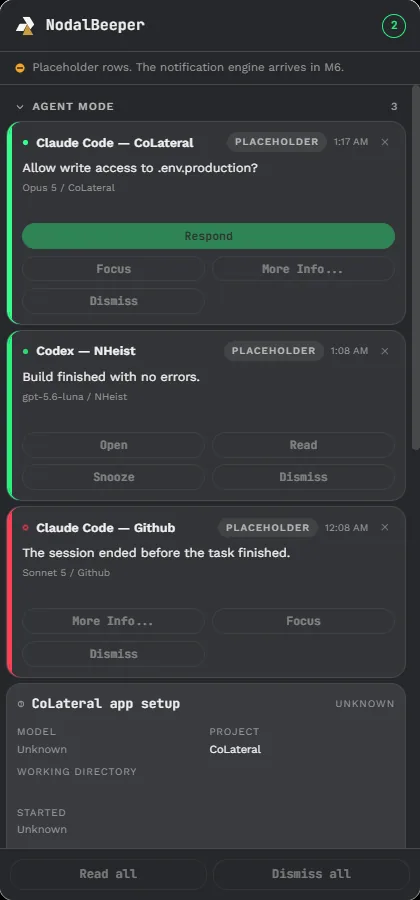
What a notification contains#
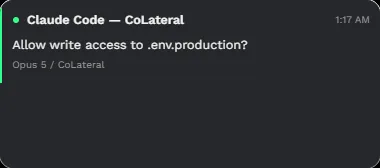
Every row carries the agent and session name, a timestamp, the message, the model and project line and a status mark. Rows come in two flavors, borrowed from v1’s hard-won rules. A report (something finished) flashes briefly and takes itself away. A request (something is asking you) stays, pulsing, until the session stops asking. Which session changes are announced is configurable.
The actions on a card depend on what the row is. An agent that needs you offers Respond, Focus, More info and Dismiss. A finished build offers Open, Read, Snooze and Dismiss. An error offers More info, Focus and Dismiss. A card never shows a button it cannot honor: an action appears only when the provider reported the capability, and otherwise it is disabled with a short reason. Read all and Dismiss all sit at the bottom of the window. A session card expands to the details that are real for that session: model, project, working folder, start time, session ID, context, 5-hour and weekly limits, and process information, with “Unknown” shown plainly where Nodal does not know.
When the panel is tucked away, all that remains on your desktop is a small mark in the theme colors, with a count of what needs you.

Answering without hunting#
The point of the card is that you can resolve it right there. Respond opens a compact window with the agent’s own question, rebuilt as structured options: a command approval with its working directory and reason, a list of choices, or a set of questions with a final Submit. The same question appears in the same shape wherever it is shown, in the conversation or in the notification center, so there is one schema and two places to answer. You can also Focus, which brings Nodal forward and selects the exact session by its stable ID, or open the app straight to that session.
You can also bring up your current agents and send any of them a prompt directly from the panel, without opening the main window. Pick a session, type or dictate, preview what will be sent, confirm, and the prompt is delivered to that session. Pending deliveries appear as one special card inside the same panel rather than a separate dialog.
Voice and text, safely delivered#
Dictation comes from NodalVoice, a separate Windows app that listens when you hold a key chord and transcribes locally by default. When you finish speaking it asks where the text belongs: into a specific agent session as a prompt, or into another window such as Notepad or Obsidian. An optional step lets another AI agent rewrite the dictation into a cleaner prompt before it goes anywhere.
Sending words into a running agent is the kind of feature that can go wrong quietly, so the design is cautious. The connection between NodalVoice and Nodal is a Windows named pipe with a per-user security descriptor plus a shared-secret token handshake as a second layer. The message format has no field for raw audio at all, so audio cannot cross the line by accident. If the pipe is unreachable, the transcript is never lost; it stays in NodalVoice’s own history. Every delivery goes through preview, confirm and a capability re-check, and the audit trail records request ID, time, target session, result and prompt length or hash, never the text itself. The goal is that a wrong-target or unauthorized send is structurally hard.
A related idea is explicitly guarded. One agent asking Nodal to send a prompt to another agent, by parsing its output, is a form of background prompt injection, and the project’s rule is that an agent’s own text must never silently trigger a real delivery. If it is ever built, it needs the same preview and confirmation gate. See AgentBoard for the safe version of agent-to-agent talk.
Which events pop up#
Nodal maps every provider into one set of canonical states (Idle, Working, Waiting for user, Waiting for approval, Error, Exited, Unknown) and canonical events. Only a few of them raise an operating-system toast: a request for approval, a request for input, a completed task, an error and an unexpected exit, plus a failed prompt delivery. All the other events update the panel silently. Toasts are deliberately minimal and redacted. They never include the full prompt, and detailed questions and choices appear only inside the panel after you act. A tray icon with an attention-count badge and a quick menu gives you a second way in.
Toasts and the panel are fed by stable event identities with local sequence numbers, so a duplicate or out-of-order event cannot create a ghost notification. A built-in Agent Simulator can drive every state on demand so the whole pipeline is testable without a real provider session or a real mistake.
A walk-through#
Imagine three agents at work. Builder is changing a settings page in Agent Mode, a second session is running tests in Tab Mode, and a third is waiting for a decision. The collapsed mark in the corner shows a count. You hover over it and the window expands. At the top is the red-edged card for the waiting agent: its name, the project, the question and a green Respond button. Below are a green card for the finished test run with Open, Read, Snooze and Dismiss, and a muted row for the session that is still working. You press Respond, read the structured question, choose the second option and press Submit. The agent carries on, its card disappears and the mark’s count drops by one. If you would rather answer with your voice, the same step can start from a dictated prompt, as the animation above shows. In both cases you never had to find the right window.
Design rules in one place#
- One panel, never two: the toast is only an echo of the panel.
- A button appears only when the action is real; otherwise it is disabled with a reason.
- Toasts are minimal and never carry prompt text.
- Unknown stays Unknown. A crash is never reported as a clean exit.
- Delivery into an agent is previewed, confirmed and logged by hash, not by content.
Honest status#
The notification center has been built in stages. The first shell build drew the window with placeholder rows and said so on screen, the real event pipeline followed, and the beta shows the window with real captures. NodalVoice-to-agent delivery is the youngest piece: the safety contract is designed and documented, and the integration is still being worked on in public. The capture on this page is from the early build with placeholder rows, labeled as such. See the roadmap for what is next, and the security page for the privacy rules behind the toasts.